Less setup. More music.
Plug-ins, DAW templates, Kontakt instruments and keyboard presets from musicians who still play every week. Making a record? Work with the klabs team too.
Works with Logic Pro · Ableton Live · FL Studio · Kontakt
EQ
Compressor
Saturation
Delay
Reverb
Tap a light to switch an effect off and watch the output change.
Plays nicely with
- Logic Pro
- Ableton Live
- FL Studio
- AU
- VST3
- Standalone
- macOS
- Kontakt
- Kontakt Player
- Yamaha Montage
- Yamaha MODX
- WAV
Pick your format
Start with what your rig already runs.
Processing for your mix, sessions for your DAW, instruments for Kontakt and patches for your keyboard.
- 3 products
Plug-ins
Atlas and mix plug-ins, inside your DAW
- Atlas
- HALO
- Lorem Suite
From $99See plug-ins - 3 products
DAW Templates
Ready-to-play sessions for Logic, Ableton and FL
- Dolor Template
- Sit Amet Template
- Consectetur Template
From $40See daw templates - 1 product
Hardware Presets
Live-ready patches for Montage and MODX
- Adipiscing Presets
From $15See hardware presets - 2 products
Kontakt Libraries
Playable instruments for Kontakt
- Elit Library
- Tempor Library
From $25See kontakt libraries - 1 product
Sample Packs
Bass recordings for any DAW
- Magna Samples
From $10See sample packs - 10 productsEverything, one placeOpen the shop
On offer now
Meet Atlas.
Atlas gives producers, engineers, and musicians instant access to mixing references, mastering guides, audio calculators, frequency maps, loudness references, effect explanations, and more - right when you need them.
Plug-ins · Mixing & Mastering Reference Toolkit
Atlas
Mixing references, mastering guides, audio calculators and checklists, open inside your DAW.
- Mix & master references
- Audio calculators
- Effect encyclopedia
- Psycho acoustics
- Mix & master chains
- Mix, master & live checklists
Your next production decision shouldn't require a Google search.
You're in the middle of a mix.
Then you wonder:
- What frequency is C#?
- Where is vocal mud?
- What does compressor attack actually do?
- What's the delay time at 117 BPM?
- What does True Peak actually mean?
- Why does my master sound smaller after limiting?
- How much headroom should I leave?
Atlas puts those answers inside your production workflow.
Built for the moment you need it
Search for a concept.
Get the useful answer first.
Atlas doesn't make you dig through a 40-hour course to find one piece of information.
Search and get a concise explanation, relevant values, practical context, and what to check next.
Example answer
A build-up in the low mids that makes a vocal sound boxy or muffled.
Values
- Usually 200-500 Hz
In practice
Sweep a narrow boost to find it, then cut gently (1-3 dB) instead of scooping wide.
Everything inside Atlas.
See Atlas- See Atlas:
Mixing References
Frequency maps, EQ references, masking relationships, instrument profiles, and practical starting points.
- See Atlas:
Mastering References
LUFS, True Peak, dynamics, stereo, phase, clipping, limiting, EQ, compression, and mastering workflows.
- See Atlas:
Audio Calculators
BPM to milliseconds, note to frequency, dB to linear, loudness comparisons, and more.
- See Atlas:
Effect Encyclopedia
Understand what an EQ, compressor, limiter, clipper, saturator, reverb, delay, and other processors actually change in your mix.
- See Atlas:
Psychoacoustics
Understand masking, phase, stereo perception, equal-loudness, harmonics, and more - explained from a production perspective.
- See Atlas:
Production Checklists
Know what to check before exporting your mix or master.
Staff picks
Road-tested before they reach you.
A short list of plug-ins, sessions and sounds. Each one earned its place on our own shows and recordings first.
- AU
- VST3
- Standalone
- macOS
HALO
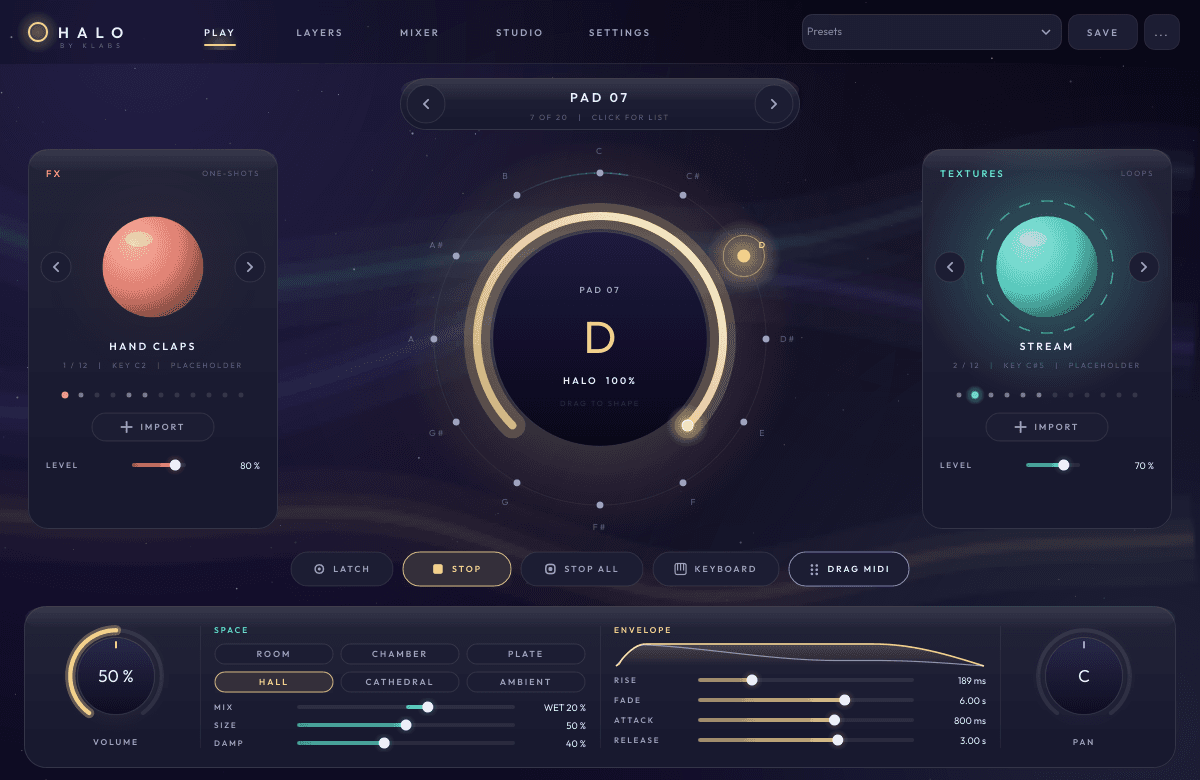
An atmospheric instrument that turns pads into evolving shimmer, in every key.
Download
- Format A
- Format B
Lorem Suite
Lorem ipsum dolor sit amet, consectetur adipiscing elit.
Key + installer
- DAW One
- DAW Two
- DAW Three
Dolor Template
Sed do eiusmod tempor incididunt ut labore et dolore.
Download
- DAW One
- DAW Two
- DAW Three
Sit Amet Template
Ut enim ad minim veniam, quis nostrud exercitation.
Download
- Sampler
Elit Library
Sunt in culpa qui officia deserunt mollit anim.
Download
Who we make it for
For people with a set list this weekend.
Sunday service, Friday residency or a Monday mix session: there's a klabs tool that fits how you work.
Players on the circuit
Patches and sessions that load ready to play, so soundcheck is for the room, not your settings.
See templatesProducers and engineers
Mix processing and pre-routed sessions that give every song a head start.
See plug-insGospel, soul and R&B makers
Sessions, patches and instruments voiced for the music you actually make.
See templates